Choosing the right productivity suite is one of those decisions that feels small at first – until your team is using it every single day. If your business is weighing Microsoft 365 vs Google Workspace, you’re not alone. These two platforms power millions of organisations worldwide, and each has its strengths. The right choice can improve collaboration, cut costs, and make work feel smoother. The wrong one can lead to frustration, inconsistent document formats, and unnecessary software bills.
In this guide, we’ll break down both options in a clear, practical way so you can decide what fits your business best – without jargon or guesswork.
Problem / Pain Point
For small to medium UK businesses, the struggle usually comes down to a few core questions:
- Which toolset will our team adopt easily?
- What’s better value for money?
- How well do they integrate with our existing systems?
- Will it help us collaborate on documents and emails effectively?
- What happens if we already use some Microsoft or Google tools?
With so many pricing tiers, overlapping features and marketing claims, it’s easy to feel overwhelmed. This comparison strips all that back to what actually matters day-to-day for your team.
Helpful Information / Solutions
What Are Microsoft 365 and Google Workspace?
Both are cloud-based productivity suites that help teams create documents, communicate, collaborate and manage files. They include email hosting, calendars, storage and apps like word processors and spreadsheets. However, they differ in approach, interface and the apps you use.
Core Comparisons
1. Email and Calendar
Microsoft 365
- Uses Outlook for email and calendar.
- Offers robust email organisation features (focused inbox, rules).
- Strong offline support — Outlook works well even without internet.
- Excellent for larger organisations or those that require advanced email management.
Google Workspace
- Uses Gmail and Google Calendar.
- Clean, simple interface familiar to many people already.
- Great search and threaded conversations.
- Works entirely in the cloud — offline support exists but is less seamless than Outlook.
Quick Decision Guide
- Prefer a familiar, simple, browser-first interface → Google Workspace
- Need powerful email organisation and offline access → Microsoft 365
2. Word Processing, Spreadsheets & Presentations
|
Feature |
Microsoft 365 |
Google Workspace |
|
Word Processor |
Word (feature-rich) |
Google Docs (simpler, real-time collaboration first) |
|
Spreadsheets |
Excel (industry standard) |
Google Sheets (excellent cloud collaboration) |
|
Presentations |
PowerPoint (advanced features) |
Google Slides (easy sharing) |
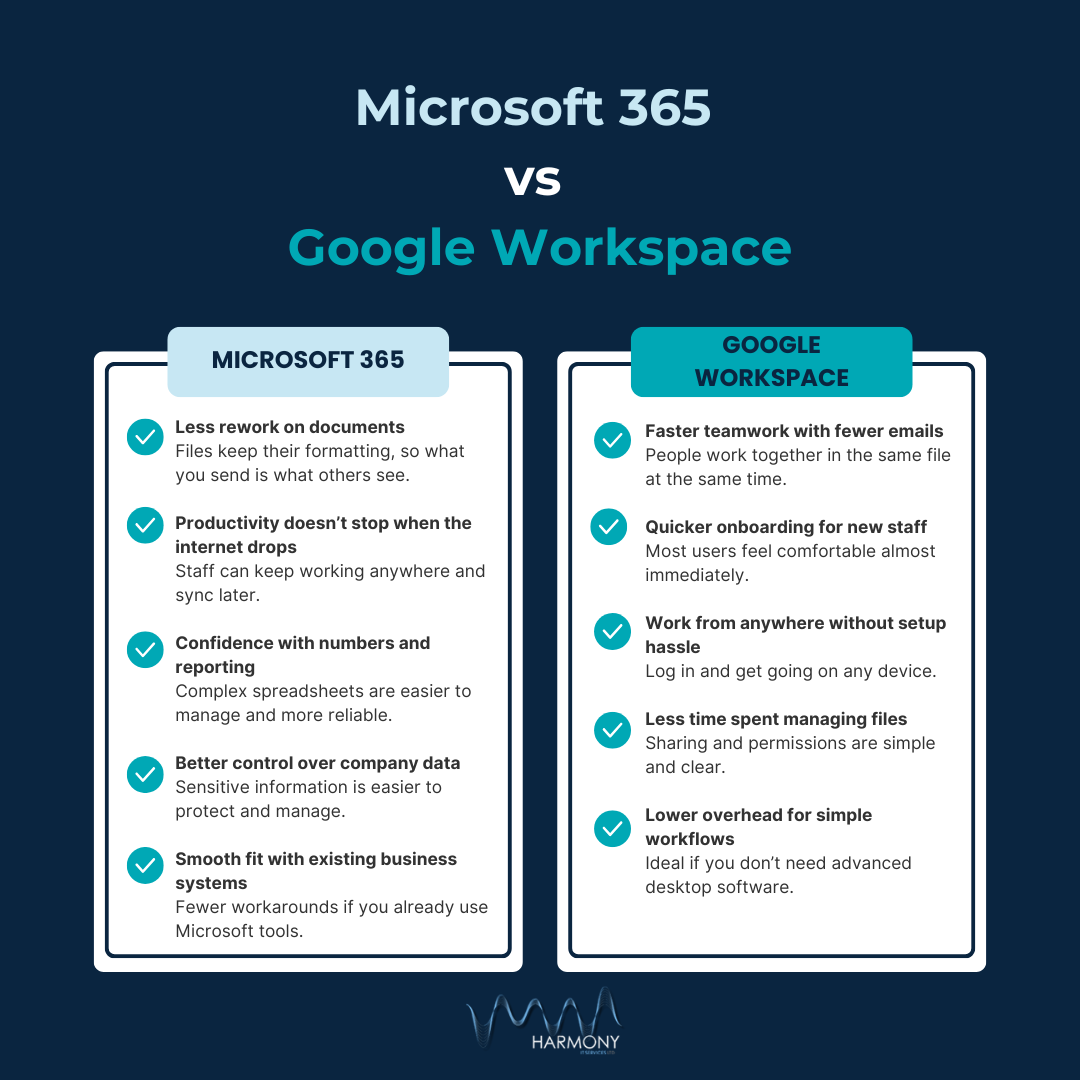
Microsoft 365 shines in advanced features and formatting options, especially for Excel and PowerPoint. If your team creates complex reports and heavy analysis, it’s usually stronger.
Google Workspace shines in real-time collaboration and ease of use, especially for teams who edit together at the same time.
3. Collaboration & Real-Time Editing
Both platforms allow multiple people to work on a document simultaneously.
Google Workspace
- Real-time editing feels very fluid.
- Comments and suggestions are easy to follow.
- Every file version is auto-saved and easy to restore.
Microsoft 365
- Real-time editing works well, especially through OneDrive or SharePoint.
- Word and Excel collaborate in the cloud more recently – historically desktop-first.
- If your team uses desktop Office apps a lot, this feels more familiar.
Quick Tip: If your team collaborates heavily in real-time across different locations, Google’s approach is often smoother.
4. Storage and File Management
Microsoft 365
- Uses OneDrive for personal files and SharePoint for team file spaces.
- OneDrive integrates deeply with Windows.
- Great file sync capabilities between cloud and PCs.
Google Workspace
- Uses Google Drive for everything.
- Very simple folder sharing and access control.
- Works inside web browser with seamless sharing links.
Decision Factor
- You work mostly from PCs and need strong desktop sync → Microsoft 365
- You prefer browser-first file access and easy link sharing → Google Workspace
5. Security & Compliance
Both suites offer strong security features, but they differ slightly in tools and visibility:
Microsoft 365
- Advanced threat protection options.
- Built-in compliance tools (e.g., data loss prevention).
- Great if you need strict control over devices and access.
Google Workspace
- Strong basic security (2-step verification, device management).
- Simple admin console with easy policy settings.
- Good choice if you prefer simplicity and ease of setup.
Both offer multi-factor authentication, encryption and device management.
6. Pricing (At a Glance)
Pricing changes occasionally, but generally:
Microsoft 365
- Business Basic: Email + online Office apps
- Business Standard: Adds desktop Office apps
- Business Premium: Includes advanced security tools
Google Workspace
- Business Starter: Basic email and Drive storage
- Business Standard: More storage + enhanced Meet
- Business Plus: More security & admin features
Value Factors
- Compare how many desktop licences you need.
- Check storage limits per user.
- Factor in migration costs from your existing system.
Examples / Analogies / Stats
Analogy: Toolbox Comparison
- Microsoft 365 is like a fully-equipped workshop. It has the full set of heavy-duty tools you might need for complex jobs (Excel, PowerPoint, Outlook). Great if you need those tools regularly.
- Google Workspace is like a portable toolset. Lightweight, easy to carry and everything is ready where you are — ideal for teams that work on-the-go and collaborate frequently.
Real-World Examples
- Marketing Agency (collaboration heavy)
Google Workspace often wins because teams can edit proposals, brainstorm in Docs, and share instantly without complex file formats. - Accounting or Finance Team
Microsoft 365 often wins due to Excel’s power for analysis and offline reliability. - Cross-Platform Teams
If users work on Macs, PCs, phones and tablets equally, Google’s browser-first approach minimises compatibility issues.
Benefits (Why It Matters Now)
Why Choosing the Right Suite Can Save You Time
- Less confusion with file formats (everyone sees the same thing).
- Fewer support calls because your tools behave predictably.
- Better collaboration without endless email attachments.
- Scales with your business — from 5 to 500+ users.
- Security and compliance built into the platform.
Why It Matters for UK Small Businesses
- Many teams are hybrid or remote — cloud-first tools help keep everyone in sync.
- Cost-control matters — paying for unused desktop licences can add up.
- Data protection rules (like UK GDPR) mean you need tools with strong security built in
Actionable Tips (Do-Now Items)
- Audit Your Current Use
- What tools are you already using? (Outlook? Gmail? Drive? Teams?)
- Which files do you open most often?
- Survey Your Team
Ask: - Which apps do you use daily?
- What frustrates you about current tools?
- Do you work offline often?
- Trial Both Suites
Set up a short pilot: - Invite a handful of users.
- Test document sharing, email, calendars and video calls.
- Calculate Total Cost
Include: - Licences per user
- Migration time
- Training time
- Plan for Migration Early
Migrating email and files can take time — don’t leave it to the last minute.
Choosing between Microsoft 365 and Google Workspace comes down to your team’s workflow, budget and collaboration style. If your work involves complex office documents and you value offline access, Microsoft 365 might be the best fit. If simplicity, web collaboration and easy sharing matter more — Google Workspace could be the better choice.
Both platforms are powerful and widely used, but the right fit is the one that your team will actually use – efficiently and without frustration.
Got a question about which one fits your business best? Get in touch and we’ll get you sorted.